FAQs
Got a question?
Our FAQs and Venue Assistant cover everything from on-sales to post-show feedback. For ticket issues, please contact your ticket provider. You can also review our Venue Rules for guidance on what is and isn’t permitted during your visit.
Announcements and on-sales
How do I find out who is playing?
To view upcoming shows and discover who’s playing, please visit our Events page. It’s regularly updated with the latest event listings and ticket information.
How do I get tickets?
To purchase tickets, visit the event listing on our Events page and follow the link to the official ticketing partner, AXS. There you’ll find availability, pricing, and seating options for each show.
What is a pre-sale?
A pre-sale is an early ticket release that gives fans the chance to buy tickets before they go on general sale. Pre-sales are often available to those who’ve signed up to our mailing list, or received a special access code from the artist or promoter. Availability is limited, so it’s best to act quickly if you have access.
To be among the first to hear about pre-sales, sign up to our mailing list or follow us on social media for announcements.
Booking tickets
How do I book tickets?
You can book tickets online by simply clicking on the 'Book Now' button on the event you wish to attend from our Events page.
If you have accessibility requirements, tickets for accessible areas of the arena are sold online for all events (subject to availability). From the booking page, select the Accessible Tickets tile.
Our official ticketing partner is AXS. Please be aware that if you buy your tickets from unauthorised outlets, you run the risk of being refused entry to the venue or not getting a refund if the event is cancelled or postponed.
What are the different types of tickets?
Ticket types vary depending on the event. Most shows offer options such as General Admission Standing, Seated, or VIP Seating/Standing (if available through the promoter or artist).
For an enhanced experience, our Premium tickets offer exclusive benefits. Visit our Premium Page to learn more.
To see what’s available for a specific event, check the event listing on our Events page.
Who should I buy tickets from?
Our official ticketing partner is AXS. We strongly recommend purchasing tickets directly through AXS via the event listing on our Events page.
Buying from unauthorised outlets or resale sites can lead to issues such as being refused entry or not receiving a refund if the event is cancelled or postponed. Always use official sources to ensure your tickets are valid.
Official ticketing sites include:
- AXS
- Ticketmaster/Live Nation
- Gigs and Tours
- See Tickets
- Ticketek
- Eventim
- Gigantic
- MyTicket
Is there a limit to how many tickets I can buy?
Ticket limits vary depending on the event. To find out how many tickets you can purchase, please check the booking page for the specific show via our Events page. Any restrictions will be clearly listed during the booking process.
How do I book group tickets?
Please contact AXS to make a Group booking, please email on ukgroups@axs.com
Can you explain ticket fees?
Ticket fees are additional charges applied during the booking process. They help cover essential services such as payment processing, ticket delivery, and costs from the venue or ticketing partner.
These fees can vary depending on the ticketing provider and the type of ticket you purchase. Some common types of fees include:
- Service fees – for handling your order and providing customer support
- Facility fees – set by the venue to help maintain and improve the space
- Delivery fees – based on how you choose to receive your ticket
All fees are clearly displayed before you complete your purchase, so you’ll always know exactly what you’re paying.
What does restricted view mean?
A restricted view seat means your view of the stage or performance may be partially blocked or limited — for example, by equipment, barriers, or the venue layout. These seats are clearly marked as restricted view at the time of booking, so you’re aware before purchasing.
Do I need to purchase a child's ticket?
This depends on the event’s age policy. Some events may offer discounted child tickets, while others require all attendees, regardless of age, to have a standard ticket. In many cases:
- Children under a certain age (e.g. under 2) may not need a ticket if they sit on a parent or guardian’s lap.
- Older children will usually need their own ticket, even if they’re accompanied by an adult.
We recommend checking the specific event page for age restrictions and ticketing details, as policies can vary by show and promoter.
Managing Your Booking
I can no longer attend the event – what can I do?
We’re sorry you can’t make it. All ticket purchases are non-refundable and non-exchangeable, as stated at the time of booking. If you bought your ticket through an official provider, like AXS, you may be able to transfer it to someone else or list it for resale through their app — please check their app or website for details.
We recommend avoiding unofficial resale platforms, as tickets purchased through these may not be valid for entry.
How do I put my tickets up for resale?
AXS Official Resale provides the option to resell tickets at face value with a cap of no more than 10% above the price paid by fans. To find out how to do this, please visit the AXS website here.
This helps prevent ticket touting and helps combat illegal counterfeiting. We know that fans of live entertainment have been looking for a solution to these issues for a long time.
Can I change my seat after I’ve booked it?
All ticket purchases are final, and we’re unable to make changes to seat selections once a booking is confirmed. Please contact your point of purchase if you have any issues.
If you're looking to enhance your experience, you may be able to upgrade to a Premium ticket, dependent on availability, offering exclusive seating and hospitality options.
Visit our Premium Page to see what’s available for your event.
Since booking my ticket, my circumstances have changed, and I need to change to an accessible ticket. How can I do this?
If your circumstances have changed and you need to update your ticket type due to accessibility requirements, please contact the original point of purchase directly. While we are the venue hosting the event, we are unfortunately unable to assist with ticket changes.
Can you give me information about the view from a particular seat I’ve booked?
Unfortunately, we’re unable to provide specific details or images of the view from individual seats. However, if your seat has a restricted view, this would have been clearly indicated at the time of booking.
For general guidance, you may wish to check the seating map on the ticketing provider’s website or refer to fan forums and review sites for personal experiences.
Venue App
Is there an official venue app?
Yes! The official bp pulse LIVE app is now available on the App Store and Google Play. It is currently being rolled out for selected events to help you manage tickets and plan your visit.
If you have been contacted by your ticket agent and advised to download the venue app, please visit our Venue App Guide for a full walkthrough on how to set up your account and access your tickets.
How do I know if the venue app is available for my event?
If the app is active for your show, you will receive an email before your visit with specific instructions. You can also check the dedicated event page on our website; if the event is mobile-only via the app, it will be clearly stated there.
How do I access my tickets in the venue app?
To view your tickets, simply download the app and create an account using the exact same email address you used to purchase your tickets. Once logged in, tap 'Retrieve My Tickets' and link your AXS account.
-
Email Match: If you used a different email address by mistake, please delete the app account and re-register with the correct one.
-
Troubleshooting: If your tickets still don't appear, you can access them via the AXS app, contact AXS Support for assistance. or visit the venue Box Office on the night with your order confirmation and photo ID. Please note that a £2.00 fee per ticket will apply for this service.
For a step-by-step visual guide, please visit our Venue App Guide
Before you go
When will I receive my tickets?
Ticket delivery times can vary depending on the event and the ticketing provider. In most cases, mobile tickets will appear in your account or app closer to the event date. You’ll receive a notification or email once your tickets are ready.
If you haven’t received your tickets and the event is in less than 5 days, please contact your ticket provider directly for support.
What forms of tickets does the venue accept?
We accept mobile tickets from official ticketing sites, including the AXS app, depending on where you purchased your tickets. You do not need to transfer tickets between apps — just ensure your ticket is accessible and ready to scan on the app you bought it through.
Always check your ticket provider’s instructions before arriving to avoid any entry issues.
Do I need to print my tickets?
We are a mobile-only venue, and all tickets must be accessed via our mobile ticket delivery system. Your tickets will be available through the app provided by your point of purchase.
If you do not have a mobile device or are unable to download the app, your tickets will need to be printed at our Box Office. Please note that a £2.00 fee per ticket will apply for this service.
What if I can't access the app?
Your AXS Mobile ID and the AXS App are the main delivery options for bp pulse LIVE.
If you are unable to download the app, please contact the venue box office on show night with your order confirmation and ID or reach out to the AXS support team here.
How do I transfer tickets to someone else in my party?
Most events allow for ticket transfer. If it is available for your event, please follow the steps below:
- Click on the tickets icon and select the event you wish to transfer tickets for.
- Then, press 'Transfer', select the ticket, and enter the details of the person you wish to transfer the ticket to. Please ensure you have entered the correct email address - the email address must be associated with an AXS account for the transferee to view their tickets.
- Review and then confirm the transfer.
For more information, visit the AXS support guide here.
Please note: Transfers can not be undone once sent, so make sure you enter the correct details.
If ticket transfer is not available for your event, all members of the party must arrive together.
Most events allow for ticket transfer. If it is available for your event, please follow the steps below:
- Click on the tickets icon and select the event you wish to transfer tickets for.
- Then, press 'Transfer', select the ticket, and enter the details of the person you wish to transfer the ticket to. Please ensure you have entered the correct email address - the email address must be associated with an AXS account for the transferee to view their tickets.
- Review and then confirm the transfer.
For more information, visit the AXS support guide here.
Please note: Transfers can not be undone once sent, so make sure you enter the correct details.
If ticket transfer is not available for your event, all members of the party must arrive together.
Most events allow for ticket transfer. If it is available for your event, please follow the steps below:
- Click on the tickets icon and select the event you wish to transfer tickets for.
- Then, press 'Transfer', select the ticket, and enter the details of the person you wish to transfer the ticket to. Please ensure you have entered the correct email address - the email address must be associated with an AXS account for the transferee to view their tickets.
- Review and then confirm the transfer.
For more information, visit the AXS support guide here.
Please note: Transfers can not be undone once sent, so make sure you enter the correct details.
If ticket transfer is not available for your event, all members of the party must arrive together.
Most events allow for ticket transfer. If it is available for your event, please follow the steps below:
- Click on the tickets icon and select the event you wish to transfer tickets for.
- Then, press 'Transfer', select the ticket, and enter the details of the person you wish to transfer the ticket to. Please ensure you have entered the correct email address - the email address must be associated with an AXS account for the transferee to view their tickets.
- Review and then confirm the transfer.
For more information, visit the AXS support guide here.
Please note: Transfers can not be undone once sent, so make sure you enter the correct details.
If ticket transfer is not available for your event, all members of the party must arrive together.
Most events allow for ticket transfer. If it is available for your event, please follow the steps below:
- Click on the tickets icon and select the event you wish to transfer tickets for.
- Then, press 'Transfer', select the ticket, and enter the details of the person you wish to transfer the ticket to. Please ensure you have entered the correct email address - the email address must be associated with an AXS account for the transferee to view their tickets.
- Review and then confirm the transfer.
For more information, visit the AXS support guide here.
Please note: Transfers can not be undone once sent, so make sure you enter the correct details.
If ticket transfer is not available for your event, all members of the party must arrive together.
Most events allow for ticket transfer. If it is available for your event, please follow the steps below:
- Click on the tickets icon and select the event you wish to transfer tickets for.
- Then, press 'Transfer', select the ticket, and enter the details of the person you wish to transfer the ticket to. Please ensure you have entered the correct email address - the email address must be associated with an AXS account for the transferee to view their tickets.
- Review and then confirm the transfer.
For more information, visit the AXS support guide here.
Please note: Transfers can not be undone once sent, so make sure you enter the correct details.
If ticket transfer is not available for your event, all members of the party must arrive together.
Most events allow for ticket transfer. If it is available for your event, please follow the steps below:
- Click on the tickets icon and select the event you wish to transfer tickets for.
- Then, press 'Transfer', select the ticket, and enter the details of the person you wish to transfer the ticket to. Please ensure you have entered the correct email address - the email address must be associated with an AXS account for the transferee to view their tickets.
- Review and then confirm the transfer.
For more information, visit the AXS support guide here.
Please note: Transfers can not be undone once sent, so make sure you enter the correct details.
If ticket transfer is not available for your event, all members of the party must arrive together.
Most events allow for ticket transfer. If it is available for your event, please follow the steps below:
- Click on the tickets icon and select the event you wish to transfer tickets for.
- Then, press 'Transfer', select the ticket, and enter the details of the person you wish to transfer the ticket to. Please ensure you have entered the correct email address - the email address must be associated with an AXS account for the transferee to view their tickets.
- Review and then confirm the transfer.
For more information, visit the AXS support guide here.
Please note: Transfers can not be undone once sent, so make sure you enter the correct details.
If ticket transfer is not available for your event, all members of the party must arrive together.
How do I find out event timings?
Door opening times and show start times vary for every event and should be detailed on your ticket.
Running times are usually confirmed closer to the event. These will be posted as soon as we have them on the Event page, so check back a week before for updates.
Please note, all timings are approximate and subject to change with no notice.
How do I get to the venue?
For directions, transport options, and travel tips, please visit our Getting Here page. It has everything you need to plan your journey smoothly.
Is there parking at the venue?
We recommend visiting the Parking page for full details and to pre-book your space in advance. This will help ensure a smooth arrival and avoid delays on the day.
Premium
Where can I buy Premium tickets?
Premium tickets, experiences and upgrades are available only via our ticketing partner AXS.com
When will I get my tickets?
Tickets should be available via your AXS app or venue app at least 2 days before the event. Ensure the AXS and venue app is downloaded on your mobile and lead booker is logged in before you get to the venue.
Can I sell my tickets?
Tickets can be sold via AXS Official resale. Visit AXS.com or the app for more information.
Can I forward tickets to friends/family or give presents?
Yes, log in to AXS mobile app and transfer to a new email address.
What time does Premium open?
A digital itinerary will be sent out 7 days prior to the event detailing package details and timings.
Where is the Premium entrance?
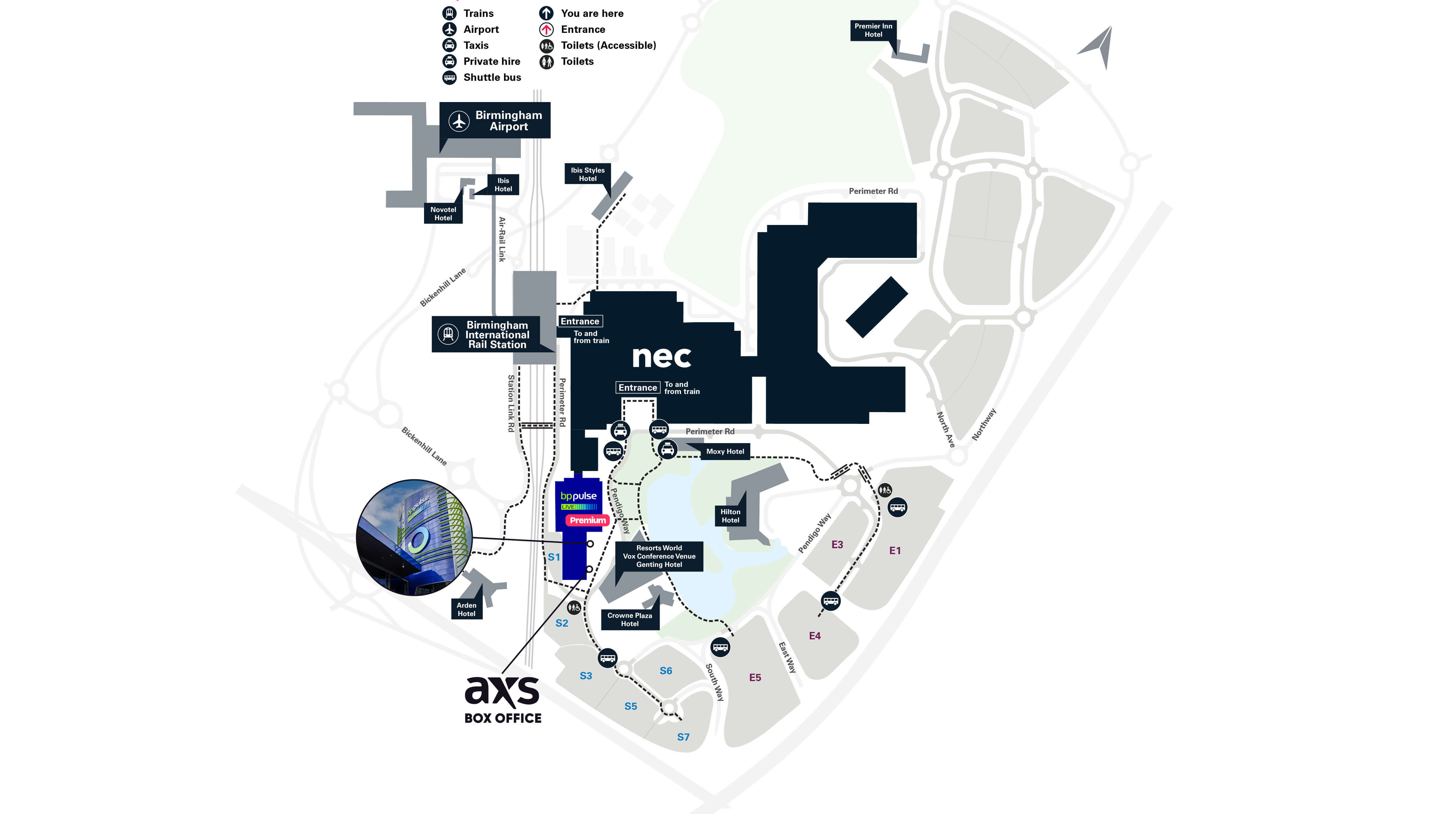
Head to the Premium Lakeside Entrance to check in.
Can I purchase food in the Premium area’s?
Dependant on the package food may be included. However, our premium lounges will have food available to purchase. Details can be found on the itinerary.
I have a dietary requirement
Please email premium@necgroup.co.uk 7 days prior to the event with details of your dietary requirements.
I have tickets, can I upgrade to Premium?
We are unable to change existing seated or standing tickets but often upgrades are available. You may be able to purchase a lounge or package upgrade via AXS.com. Please visit the event page for more information.
I have bought an upgrade, what does that include?
With an upgrade you can enjoy access to elements of a premium experience but does not include a premium seat or entry into the venue without a standard ticket. You must have a standard ticket before purchasing an upgrade and will be seated at your original seat, not in a premium area.
Are there accessible tickets available in premium?
Various premium accessible seats are available in the Premium balconies. Please contact the Premium team with your Nimbus card number and event details. Accessible tickets are subject to availability.
Can children come into the lounges?
Children are welcome in the Premium lounges. All children over the age of one must have a ticket.
Planning your travel
How do I pay for parking?
For the smoothest experience and the best rates, we recommend pre-booking your parking in advance. However, if you don’t manage to pre-book ahead of time, you can still pay for your parking before you leave – Please visit the parking machines in the venue and/or see the signage advertised in the venue for instructions on how to pay on the day.
How far in advance can I book my parking?
It is possible to book up to 3 months in advance of your event, subject to availability. If your event is less than 3 months away but is not available to pre-book, please keep checking the website as we always aim to upload parking details 3 months in advance, though there may be occasional delays.
How do I know what car park to park in when I arrive at the NEC/BPPL?
Once you arrive on site simply follow the digital screens for directions to the car parks. Each event will be listed and which car park to park in will be clearly indicated.
Are there any restrictions on vehicles that can park in the car parks?
Bookings can only be made for cars/vehicles which fit within a standard parking space. There are no height restrictions on our standard car parks.
Does pre-booking guarantee me a space in a specific car park?
With over 16,000 parking spaces available on the NEC campus, there are plenty of spaces for all our visitors; however, pre-booking does not guarantee a space in a specific car park.
If you have pre-booked Express Parking, you are guaranteed a parking space close to the venue. Please note, Express Parking spaces are subject to availability.
Is Express Parking available for every show?
Express Parking is available on most shows, but not all. If Express Parking is offered for your show it will show as available at the point of booking.
What are the Express Parking stay periods?
For a day event the NEC Express stay periods are: 08:00 – 18:00
For an evening event, the NEC Express stay periods are: 18:00 – 23:59
Please do not arrive too far in advance of your event as we may not be able to grant you access to the Express car park ahead of time. If you stay in the car park beyond these times, overstay charges will apply.
What happens if I don’t manage to pre-book?
If you don’t manage to pre-book ahead of time, you can still pay for your parking before you leave - please see the signage advertised in the venue for instructions.
What time can I arrive at the NEC to park ahead of my event?
Standard pre-booked parking allows you to park from 6.00am – 2.00am. If you have not booked overnight parking and you leave your vehicle in the car park beyond 2.00am overstay charges will apply.
I need to pay for parking on the day – how do I do this?
Please visit the parking machines in the venue and/or see the signage advertised in the venue for instructions for how to pay on the day.
Can you park for free with a blue badge?
Accessible parking is charged at the standard parking rate. We recommend pre-booking your parking in advance for the best rates.
Do you have to have a blue badge to book accessible parking?
Yes, your blue badge will be checked on arrival by one of our car parking attendants.
Does pre-booking accessible parking guarantee me a spot in a specific car park?
No, pre-booking accessible parking does not guarantee a specific car parking spot. For most Arena events, wider-space parking is available next to the Arena in the South 1 car park on a first-come, first-served basis (regardless of pre-payment). This car park is a 20–50m walk to/from the Box Office Accessible Entrance.
If the Arena disabled parking area is full, customers will be directed to the overspill area in the South car parks (approx. 100–250m walk). Additional parking is available in the East car parks, serviced by free, accessible shuttle buses with a drop-off/pick-up point in front of the Arena Lakeside Accessible entrance (open from doors open time).
Where is the bp pulse Gigahub™ located?
When you arrive on the NEC Campus, please follow signs to East 3 carpark (located next to the Starbucks drive-thru) to find the bp pulse Gigahub™
How many EV chargers are there?
There are 180 bp pulse EV charge points at the bp pulse Gigahub™ located in NEC East Car Park 3. There are 150 points for 7kW charging, including additional designated accessible bays which are available to pre-book via the NEC parking portal and 30 ultra-fast 300kW DC chargers which are only available on a first come first serve basis.
How do I use the chargers at the bp pulse Gigahub™?
Please refer to the user guide here if you need help using the chargers at the bp pulse Gigahub™
What do I do if I need help with my parking at the bp pulse Gigahub™?
If you need help using a bp pulse Gigahub™ please get in touch with the bp team via the app or by calling 0330 016 5126
Can I amend or cancel my booking?
You can amend your booking details, but it is not possible to cancel your booking. If you need to make any changes ahead of our event, simply use the 'Manage my Booking' link in your confirmation email - amendments can be made right up until midnight the day before your arrival.
How do I get my booking confirmation resent?
If you have lost your booking confirmation number, you will be able to retrieve the details from the “Manage My Booking” link on your email confirmation.
What do I do if I think I have been overcharged for parking?
Please contact the NEC Parking team on necparking@necgroup.co.uk with details as to why you believe you have been overcharged.
I can’t find an answer to my question in the FAQs.
If you can’t find an answer to your question above, please contact the NEC Parking team on necparking@necgroup.co.uk. Please note, our parking team receives a high volume of requests, particularly at busy event times, so it may take several days for your email to be responded to.
Premium Customers Parking
Premium parking is not located in one of our ANPR-controlled car parks – Premium customers should check their itinerary for specific parking instructions.
Arriving at the venue
What are your current security measures?
At the NEC we are constantly reviewing our measures to ensure that they remain effective and proportionate. West Midlands Police and Counter Terrorist Security Advisors work in partnership with us at the venue, often deploying a variety of resources to work alongside those of our team. These include a number of overt and covert security measures, so whilst you may not see all operational security activity, you should be assured that it is on-going, often behind the scenes to prevent crime and keep you safe whilst you enjoy your visit.
Visit our venue security page for more information: Venue Security
Where is the box office and when does it open?
The box office is located next to the main venue entrance. It opens on event days, usually from around 4PM for evening shows, but times can vary depending on the event.
Please note, the box office is not open on non-show days.
Are there queuing and toilet facilities outside the venue?
Queuing facilities depend on the event and may not be set up until closer to the doors opening. We kindly ask that you avoid arriving too early, as early queuing may not be permitted.
Toilet facilities are located inside the venue and will be accessible once doors open.
What time do doors open and where should I queue?
Door opening times will be listed on the event page on our website and included in the pre-event email. However, specific queue locations are not listed in advance, as they can differ by event and ticket type (e.g. general admission, VIP, accessible entry).
If you're unsure where to go when you arrive, just speak to a member of our team outside the venue - they’ll be happy to assist and direct you to the correct entrance.
Can I bring food or drink to an event?
We have a variety of food and drink outlets inside the venue to suit the majority of dietary requirements. For more information, visit our Food and Drink page. While we typically don’t allow outside food and drink into the venue, we want to make sure all fans feel safe and supported. If you need to bring food and drink to manage a medical condition, you're absolutely welcome to do so.
To help us prepare and ensure our event team is aware, please fill out our Medical Exemption form in advance and include as much detail as you can.
Please note, the medical exemption letter does not grant you automatic entry to your event and all belongings will still be subject to a search by our security team upon arrival.
Do you operate a numbering system for the queue?
No — we do not operate or endorse any numbering system for a standing queue. This is to discourage early queuing and ensure a fair experience for all guests. While fans may create their own systems, please be aware that these are unofficial and may not be recognised by venue staff.
What am I allowed to bring into the venue?
To keep everyone safe and ensure a smooth entry process, certain items are not permitted inside the venue. We recommend checking the Venue Security page for the most up-to-date list of prohibited items and bag policies before you arrive.
Please note that all bags may be subject to search.
How do I get a medical exemption/exemption to bring certain items in?
While we typically don’t allow outside items into the venue, we want to make sure all fans feel safe and supported. If you need to bring medical supplies, equipment, or food and drink to manage a medical condition, you're absolutely welcome to do so.
To help us prepare and ensure our event team is aware, please fill out our Medical Exemption form in advance and include as much detail as you can.
Please note, the medical exemption letter does not grant you automatic entry to your event, and all belongings will still be subject to a search by our security team upon arrival.
Do I need to bring ID to the event?
If there is a strict ID policy in place for your event, we will notify you at the time of booking and in subsequent event communications. Additionally, if you plan to purchase alcohol at the bar, you’ll need to show a valid photo ID as part of our Challenge 25 policy.
Accepted forms of ID include a passport, driving licence, or any government-issued photo ID with a clear photo and date of birth.
Are there any age restrictions at the event?
For all events at bp pule LIVE, children under 14 years of age must be accompanied by a responsible adult aged 18+ with a valid ticket to enter the venue.
On applicable shows, the ‘Standing Area’ of the arena bowl is not suitable for anyone under 14 years of age, and we advise booking seated tickets if your party includes anyone under the age of 14. Please note, the venue reserves the right to remove or reseat (if possible) any child in the standing area who appears to be under 14 for safety reasons.
Due to the sound levels experienced during an event, the venue recommends that children under 5 should not attend concerts or events other than those specifically aimed at younger visitors, i.e. children’s shows.
Generally, children under the age of 1 who are attending a children’s show and sitting on an adult’s knee do not need a ticket. However, we advise you to please check the event details prior to booking. Please note, though, that any interruption caused by young children/babies that directly affects other members of the audience may result in you being asked to leave the performance area.
Certain shows will also have their own specific age restrictions. Please check the relevant event page before booking to avoid any disappointment.
Can I bring a bag to the event?
Yes, provided it complies with the event/venue bag policy. Please note that there are no storage facilities available at the venue, so any bags you bring must remain with you throughout your visit.
If your bag does not meet bag policy requirements, it will not be allowed inside the venue.
What time can I queue from?
For your own safety, no queueing is permitted outside bp pulse LIVE until the day of the relevant Event.
bp pulse LIVE and the land surrounding the Arena is private property. Camping is therefore strictly prohibited. Anyone found to be camping will be asked to leave by the venue security team or security providers and/or local government bodies. You must respect and adhere to the rules and instructions delivered by such security personnel.
bp pulse EVIP Lounge FAQs
What is the bp pulse EVIP Lounge?
Where is the bp pulse EVIP Lounge?
The bp pulse EVIP Lounge has its own private entrance so you can skip the queue into the arena. The entrance is located at the bottom of the tower to the right of the main arena doors. The lounge is located on the mezzanine level of The Forum.
How do I book EVIP Lounge passes?
The bp pulse EVIP lounge is exclusive for BPme Rewards members and EV drivers who already have tickets to a show at bp pulse LIVE. Check the EVIP Lounge page to make your booking.
For eligible guests, select your show, the date you’re attending and the number of passes you’d like (up to 5). Passes are allocated on a first come, first served basis with limited availability. If you’re successful, we’ll send you a booking confirmation and details of your passes. Please check all details, tickets and age restrictions before the event. Your guests must also have tickets to the same arena event.
Can I access the bp pulse EVIP Lounge if I haven’t booked?
Subject to availability, walk-in bookings are available until one hour before the EVIP Lounge closes on the day of the arena show. When you arrive at the arena, head to the bp pulse EVIP Lounge entrance and speak to a member of staff.
How many guests can I bring to the bp pulse EVIP Lounge?
You can bring up to four guests into the bp pulse EVIP Lounge. Passes are allocated on a first come, first served basis. Anyone who is under 14 will need to come with someone who’s 18 or over.
Do I have to drive an electric vehicle to gain access?
The ticket holder responsible for making the lounge reservation must either be a BPme Rewards member or drive a fully electric vehicle. Hybrids, including plug-in hybrids, as well as other petrol or diesel vehicles do not qualify. We ask that you bring proof of EV ownership – this can be the app on your mobile handset. If you’re a BPme Rewards member, please bring either your digital or physical membership card.
Do I need to bring proof of EV ownership or BPme Rewards membership?
Yes. If you’re an EV driver, please bring proof in the form of your EV management or EV Charging mobile app. If you’re a BPme Rewards member, please show either your digital or physical BPme Rewards card.
Is the bp pulse EVIP Lounge open for all events at the arena?
The lounge is open for most public events held at the arena. However there are some, such as sporting events or matinee / afternoon performances that it will not open for. Additionally, the lounge will not open for Horse of the Year Show or Crufts, and other private hire events. If you cannot see your event listed two months prior to the show, it is likely that the lounge will not open for that event.
What kind of food and drinks will be served?
A range of cold soft and alcoholic beverages can be purchased at the bar. Hot food can be ordered from the EVIP Lounge menu which includes burgers, pizzas, nachos and a house salad. An example menu can be found here. Note that prices and food options are subject to change.
Do passes guarantee entry to the bp pulse EVIP Lounge?
Having a pass does not guarantee entry. If there is not enough room due to our standard overbooking policy to account for no-shows, entry is granted on a first come, first served basis. Once the area is full, guests will be let in on a one in, one out basis. Please arrive early to avoid disappointment.
What time does the EVIP Lounge open and close?
The lounge opens at the same time as the arena main doors for the show you’re attending, and closes 15 minutes before the main act. Sometimes our opening and closing times change at short notice but we do everything we can to avoid this.
Are travel arrangements and expenses included in with the bp pulse EVIP Lounge passes?
No. Travel and accommodation, food and drinks, and any other expense not specifically mentioned in the event description will not be included.
How do I get my bp pulse EVIP Lounge passes?
You will receive a confirmation email containing a booking reference. You will be asked to provide your booking reference to the Welcome Desk staff. If you haven’t received your confirmation email, please check your spam folder.
Are there age restrictions for the bp pulse EVIP Lounge?
If you’re under 14, you’ll need to come with someone who’s 18 or over. If you’re under 18 you won’t be allowed to buy alcoholic drinks and if you appear to be under the age of 25, you may be asked for proof of age.
Do I need to bring ID?
You will not be asked for ID to access the lounge, unless no one in your booking party appears to be over 18. Also, if you appear to be under 25, you may be asked for ID at the bar.
My event date has been rescheduled - do I need to rebook for the bp pulse EVIP Lounge?
Yes, if your show has changed dates, you will need to rebook the lounge. Your previous lounge booking will no longer be valid, and you should receive a cancellation email.
Can I bring food or drink into the bp pulse EVIP Lounge?
No, the EVIP Lounge has its own bar and restaurant where you can grab a drink or bite to eat away from the crowds.
However, while we typically don’t allow outside food and drink into the venue, we do want to make sure all fans feel safe and supported. Therefore, if you need to bring food and drink to manage a medical condition, you're absolutely welcome to do so.
To help us prepare and ensure our event team is aware, please fill out our Medical Exemption form in advance and include as much detail as you can.
Please note, the medical exemption letter does not grant you automatic entry to your event and all belongings will still be subject to a search by our security team upon arrival.
I’m in a wheelchair/I have accessibility needs – will there be suitable access and facilities for me?
The lounge is accessible by lift and has an accessible toilet. Don’t forget you’ll need to book a pass for your essential companion too.
I’m a bp pulse subscriber, do I get guaranteed entry to the bp pulse EVIP Lounge?
No. If you drive an electric vehicle you are eligible to book the lounge for you and up to four passengers, subject to availability. This does not guarantee you entry, and you are still advised to arrive early in order to avoid disappointment.
Can I get free hot drinks in the EVIP Lounge?
Yes, the bp pulse EVIP Lounge has a complimentary self-serve hot drinks machine. Cups, lids, and stirrers are provided, and you can choose between tea or coffee, including a latte, flat white or cappuccino. Please note: only semi-skimmed dairy milk is available, and there are no decaf options. Occasionally, the machine may be unavailable due to cleaning or maintenance, and in this case we’re unable to offer an alternative free drink.
Inside the venue
What do I do if I have a problem with my seat?
If you believe your seat is broken or damaged, it’s important to let us know immediately so we can resolve the issue and ensure you’re able to enjoy the show comfortably. Unfortunately, there is little we can do to assist with seating concerns after the event has concluded.
What should I do if I need assistance/medical help?
The Arena’s medical centre is available under the Arena Bowl, next to block 1. In the event of an emergency, please notify a member of Security or any member of staff.
Can I leave and re-enter the event?
Unfortunately, there is no re-admittance once your ticket has been scanned and you have entered the venue. Please ensure you bring everything you need with you before entering.
Wil people stand up/dance in their seats?
Although your ticket may be for a designated seat, audience members in seated areas may stand during the performance. This may impact your view at times. However, standing on seats and in the aisles is strictly prohibited on health and safety grounds.
If you have accessibility requirements, please advise your ticket agent at the time of booking. We appreciate your understanding as part of the shared event experience.
Do you have quiet/sensory/prayer room?
We don’t currently have a dedicated prayer room/quiet space at the venue. We will try and accommodate your request on the day where we can but cannot guarantee available and suitable space.
Do you have a Smoking/vaping area?
Smoking and vaping are not permitted anywhere in the building. A dedicated external smoking/vaping area can be found clearly signposted in the Forum area of the venue.
Will I be able to access drinking water?
Yes, water stations can be found in public circulation areas in the Forum area, and around the Arena Bowl at blocks 3 and 15.
Will there be strobe lighting/pyrotechnics?
Strobe lighting and pyrotechnics may be used during some performances. Customers will be notified via signage on doors and/or digital screens if a performance includes the use of strobe lighting or pyrotechnics.
If you have any concerns/queries around this, please speak to a member of security on arrival who will be able to provide you with more information.
What merchandise will be available?
Merchandise availability varies depending on the event. Official merchandise units can be found around the venue.
Please be aware that certain events attract unauthorised sellers who may sell inferior products which may not be safety tested outside the venue. Those who purchase unofficial merchandise from these sellers do so at their own risk, as they may not be permitted into the venue.
After the event
I was at an event recently and my bag wasn't checked?
All bags are searched prior to entry. Our Evolv security system uses advanced sensors and AI technology to screen everyone and their bags as they enter the arena, helping security teams to identify potential threats quickly and accurately, supported by additional bag searches as required.
Bag searching is just one of many components of our security measures. For obvious reasons, we don’t go into specific security details for individual shows, as this is potentially detrimental to these processes. We have additional security measures in place, including police and dog patrols throughout event periods and at all venues to ensure you feel relaxed and comfortable while at the show. Searches will be carried out throughout the day and evening at all our sites.
I’ve lost an item – what do I do?
If you’ve lost an item while attending an event at bp pulse LIVE, drop us a message through our feedback form and ensure you select the ‘lost property’ category. Our team will be happy to look into this for you. Please note that any lost property found will be held for up to two weeks.
I have a billing query following purchasing food and drink at the Arena – what do I do?
If you have a billing query following buying food or drink within the Arena drop us a message through our feedback form and ensure you select the ‘Food & Drink Billing Query’ category. You will then receive details of how to raise your query with our catering partner, Levy.
Contact Us
How do I leave feedback?
We welcome all feedback. Share your positive feedback, or raise a complaint about your experience, by filling out our feedback form.
How can I contact you to ask a question you’ve not covered?
If you have a question that isn't covered, please let us know via our Contact Us form.